AI for UI Tests: generating Playwright/Cypress tests + fixtures, mocks, and data seeding
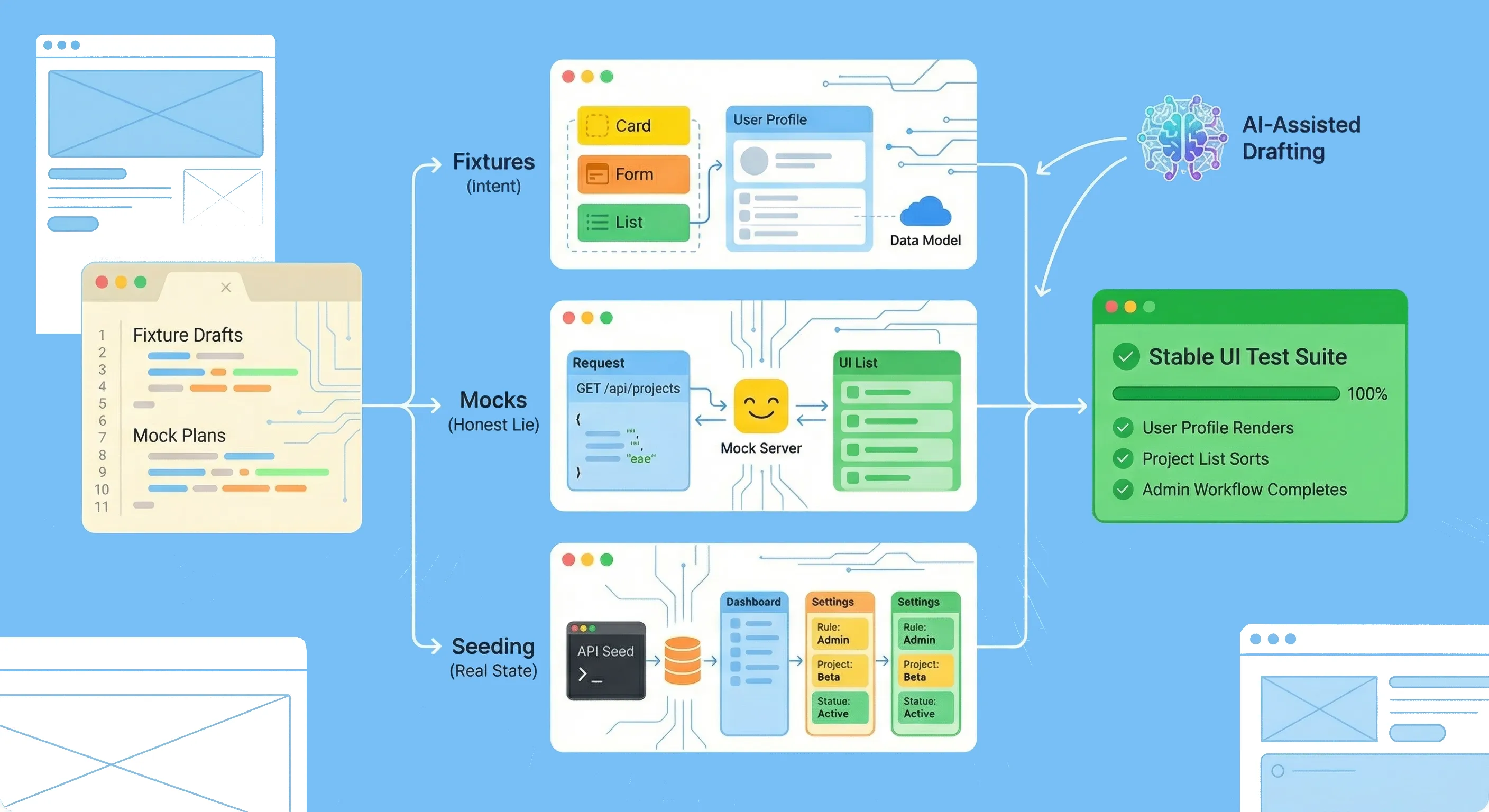
AI can absolutely help you write UI tests faster. The trap is thinking the “writing” part is the hard part.
In practice, most UI test suites fail for the same reasons: brittle selectors, non-deterministic data, leaky environment state, and tests that don’t actually prove the user outcome. AI can speed up all of that too—but only if you use it inside a workflow that’s grounded in real fixtures, intentional mocks, and predictable data seeding.
This post is for developers who want to use AI to generate Playwright/Cypress tests without creating a flaky suite you’ll regret.
1. What AI is good at in UI testing (and what it’s not)
AI is great at drafting:
- test skeletons from a spec
- edge-case matrices (happy path + realistic failure modes)
- helper abstractions (login helpers, factories, page objects when appropriate)
- fixture variants (minimal valid, missing field, permission-limited user, etc.)
AI is not good at being a truth source. It cannot reliably infer:
- what your UI actually renders in your product
- which states are valid in your backend
- which selectors are stable (unless you give it your selector policy)
- where your test environment is non-deterministic
So use a simple rule: AI drafts; humans verify. The closer the output is to “runnable code,” the more strict your verification needs to be.
2. Decide what the test must prove (before generating code)
If you ask AI “write a test for feature X,” you’ll get a test that looks right and asserts something shallow.
Instead, define a single “contract” for each test:
- User goal: what is the user trying to accomplish?
- Observable outcome: what changes in the UI that proves success?
- Failure mode: what should the user see/do when it fails?
If you can’t write those three lines, don’t generate a test yet—your spec is underspecified.
This also prevents screenshot theater: tests that assert “page contains text” but don’t validate the task.
3. The real speed lever: test data and environment
When developers say “UI tests are slow,” they usually mean:
- setup is slow (creating accounts, permissions, seeded state)
- debugging is slow (flake you can’t reproduce)
- maintenance is slow (fixtures drift, mocks lie, tests fail after refactors)
That’s why the core of AI-assisted UI testing isn’t “generate more tests.” It’s: standardise how your tests get into the right state.
You have three main tools:
- Fixtures (data you control)
- Mocks (dependencies you replace)
- Seeding (real-ish state in a real-ish system)
The trick is choosing the right one per scenario.
4. Fixtures: treat them like a tiny domain model
Fixtures work best when they’re not “random JSON files,” but a small, explicit model of your domain.
Aim for fixtures that are:
- minimal by default (only the fields that matter)
- override-friendly (so each test declares what’s special)
- readable (so failures are debuggable)
- versioned with behavior (fixtures evolve when the product evolves)
In practice, this usually means factories/builders, not copied blobs.
Example shape (language-agnostic):
makeUser({ role: "viewer" })makeProject({ name: "Alpha", members: [userId] })makeInvoice({ status: "overdue" })
Where AI helps: once you show it your domain primitives (types/schemas/examples), it can generate fixture variants quickly—but you still decide what “minimal valid” means.
Common fixture failure mode: “mega fixtures” that include everything. They hide intent and create brittle coupling to implementation details.
5. Mocks: pick the smallest, safest lie
Mocks are how you keep tests fast and deterministic—but mocks can also create a fake world that your users never experience.
To keep mocks honest:
- mock at stable boundaries (usually network/API), not deep internals
- include realistic error and latency cases (timeouts, 500s, partial data)
- validate mocked payloads against a schema/contract when possible
- avoid mocking your own business logic unless the goal is purely UI rendering
Two patterns that tend to work well:
-
Network interception for specific endpoints in E2E-ish tests (great when you want deterministic data but still exercise real UI flows).
-
Service worker–based mocking for integration-style UI tests (great when you want consistent behavior across dev/test and fewer per-test intercepts).
Where AI helps: ask it to propose a mock plan per scenario (what to mock, what to keep real, what payload variants you need). Then sanity-check that plan against your actual contracts.
6. Data seeding: when realism is the point
Some flows are hard to fake cleanly:
- role/permission matrices
- multi-step workflows with server-side rules
- data that affects multiple screens (cross-page consistency)
- “create → navigate → edit → reconcile” experiences
In those cases, seeding is often the premium option: you build the state using an API or a controlled test hook, then you run the UI flow against that state.
Seeding tends to go wrong when it’s:
- not isolated (tests share state and bleed)
- not idempotent (reruns fail)
- not cleanable (your environment becomes polluted)
Good seeding rules:
- seed via API (fast) rather than via UI (slow)
- keep seeds small and scenario-specific
- add deterministic identifiers so cleanup is reliable
- if you can’t clean up, create per-test namespaces (e.g., unique tenant/org IDs)
Where AI helps: generating seed scripts from explicit state requirements (“I need a user with role X and a project with status Y”). But you must ensure the seed path matches production rules—or you’ll ship tests that pass and users that can’t.
7. A grounded AI workflow (that doesn’t hallucinate your app)
If you want AI outputs you can trust, give it real constraints.
Inputs to provide (copy/pasteable)
- the user story + acceptance criteria
- route(s) involved
- API endpoints (or GraphQL operations) involved
- role/permission assumptions
- your selector policy (
getByRolefirst?data-testidallowed?) - a sample payload or schema for key responses
- which parts must be real vs mocked vs seeded
Outputs to ask for
- scenario list (happy path + 2–4 failure modes)
- assertion list (what actually proves success)
- fixture plan (what data needs to exist)
- mock plan (what responses vary per scenario)
- test skeletons with a clearly marked “assumptions/TODOs” section
Prompt template (short and practical)
You are helping write UI tests. Do not invent endpoints, selectors, or UI text.
If something is unknown, list it under "Assumptions" and stop.

Given:
- Product spec: <paste>
- Routes: <paste>
- API/ops: <paste>
- Selector policy: <paste>
- Data model examples: <paste>

Return:
1) Scenarios (happy + failures)
2) Assertions per scenario
3) Fixture + mock + seeding plan
4) Playwright OR Cypress test skeletons (Arrange/Act/Assert)
5) Assumptions (must be verified by a human)
This is where you win time: not by generating one test, but by generating a consistent plan across dozens of similar flows.
8. Make generated tests stable (Playwright/Cypress-agnostic rules)
AI-generated tests often fail because they copy “tutorial patterns,” not production-grade patterns.
Stability rules that age well:
- Prefer role/name queries (and a small set of stable test IDs) over CSS selectors.
- Wait for conditions (UI state, network completion signals), not time.
- Avoid asserting exact copy unless copy is the product requirement.
- Pin time/locale where it matters (dates, currency, sorting).
- Keep tests single-goal; split when assertions are unrelated.
- Capture artifacts on failure (trace/video/screenshot) and use them to remove nondeterminism.
If a test flakes, treat it as a design bug in the test architecture, not a reason to add sleeps.
9. One flow, three powering options (fixture vs mock vs seed)
Imagine a flow: create a project → see it in the list → open details.
Depending on what you’re trying to prove:
- Fixture-first (fastest): render a UI state with a known project list; prove sorting, empty states, layout, and basic interactions.
- Mocked network (balanced): keep the UI real but intercept the “create” and “list” calls with deterministic payloads; prove your UI behavior and client-side error handling.
- Seeded state (most real): create a project via API seeding, then drive the UI; prove permissions, server validation, and multi-screen consistency.
AI can draft tests for all three, but you should choose one per spec:
- If you’re testing UI logic → fixture or mocked network.
- If you’re testing system rules that users hit → seeded state.
Conclusion
AI doesn’t make UI testing easy by writing code faster. It makes UI testing sustainable by helping you standardise how tests get the right state: fixtures that express intent, mocks that are honest, and seeding that’s deterministic.
Use AI to draft scenarios, skeletons, and data variants. Use developers to verify contracts, tighten assertions, and remove nondeterminism. The result is a UI test suite that’s faster to grow—and much harder to break.